NAVIGATION
-
Accessories
-
Battery
- Battery Alcatel
- Battery Apple
- Battery Asus
- Battery BlackBerry
- Battery Diagnosable High Capacity
- Battery HTC
- Battery Huawei
- Battery JC Diagnosable
- Battery JC High Capacity
- Battery JC No POP-UP
- Battery LG
- Battery Microsoft
- Battery Motorola
- Battery Nokia
- Battery OnePlus
- Battery OPPO
- Battery Samsung
- Battery Sony
- Battery Vodafone
- Battery Xiaomi
- Cable
- Cases
- Chargers
- Earphones
- Exhibitors
- Film For Cutting machine
- Gadgets & Exhebition Stands
- Joyroom
- Memory Card
- Notebook accessories
- Power Bank
- Tempered Glass Protector
-
Battery
- Cell Phones
- Home Appliances
- Informatics
- Refurbished
-
Repair Tools
- 2UUL
- Aixun
- Antistatic Material
- Apple Motherboard Layered Tester
- Battery Message
- Boxes & Dongle
- charging ports
- Cleaning Camer
- Cleaning Tips
- Cutter and Blade
- G-LON
- IC Chip
- Internal Switches
- JC Programmer
- Lab Accessories
- Laboratory Screwdrivers
- LCD Cleaning Products
- Magnetic Mats
- Magnetic Mats
- Mechanic
- Microscope and Visors
- Mijing
- Multi Function Fixed Frame
- oxydisation cleaning products
- Phone Screen Repair
- Power Supply & Tester
- Precision Tweezers
- Preheater Soldering Station
- QIANLI
- Relife
- Replacement Tips JBC
- Sim Card Reader
- Sim Cutter & Adapter
- SMD Resistors
- Soldering Iron Handles
- Soldering Products
- Soldering Stations
- Stencil BGA Reballing
- Sunshine
- Tape - Glue Products - Kapton
- Thermal Pad
- Thermal Paste
- Tools iPhone
- Tweezers, Utensils and Opening Tools
- UV Gel & UV Lamps
Mobile Parts
- Acer Parts
- Alcatel Parts
- Amazfit Parts
- Amazon Parts
- Apple Parts
- Asus Parts
-
Blackview Parts
- Blackview 9900
- BlackView A50
- BlackView A52 Pro
- Blackview A55
- Blackview A55 Pro
- Blackview A60
- Blackview A60 Pro
- BLACKVIEW A70
- Blackview a80
- Blackview A80 Plus
- Blackview A80s
- BlackView A85
- Blackview BL6000 Pro 5G
- Blackview BV5000
- Blackview BV5500
- Blackview BV6000
- Blackview BV6200 Pro
- Blackview BV7000
- Blackview BV8000
- Blackview BV8900 PRO
- Blackview BV9200
- Blackview BV9300
- Blackview BV9600E
- Blackview BV9700 Pro
- BlackView Shark 8
- Blackview Tab 12
- BlackView Tab 7
- Caterpillar Parts
- Console Parts
-
Google Parts
- Google Nexus 9
- Google Pixel
- Google Pixel 10 (GK2MP - GLBW0 - GL066)
- Google Pixel 10 Pro (GEHN3)
- Google Pixel 10 Pro Fold
- Google Pixel 10 Pro XL (G45RY)
- Google Pixel 2
- Google Pixel 2 XL
- Google Pixel 3
- Google Pixel 3a (G020A)
- Google Pixel 3a XL (G020C)
- Google Pixel 3XL (G013C)
- Google Pixel 4 (G020M - G020I)
- Google Pixel 4 XL (G020P - G020)
- Google Pixel 4A 4G (G025J - GA02099)
- Google Pixel 4A 5G (GD1YQ - G025I)
- Google Pixel 5 (GD1YQ - GTT9Q)
- Google Pixel 5A 5G (G1F8F)
- Google Pixel 6 (GB7N6 - G9S9B16)
- Google Pixel 6 Pro (GLUOG - G8VOU)
- Google Pixel 6a (GX7AS - GB62Z - G1AZG)
- Google Pixel 7 (GVU6C - GQML3)
- Google Pixel 7 Pro (GP4BC - GE2AE)
- Google Pixel 7a (GWKK3 - G82U8)
- Google Pixel 8 (G9BQD - GKWS6)
- Google Pixel 8 Pro (GC3VE)
- Google Pixel 8A (GKV4X)
- Google Pixel 9 (G2YBB)
- Google Pixel 9 Pro (GR83Y)
- Google Pixel 9 Pro Fold (GGH2X GC15S)
- Google Pixel 9 Pro XL (GGX8B GZC4K GQ57S)
- Google Pixel 9A
- Google Pixel XL
- Huawei Parts
- Infinix
- LAPTOP PARTS
-
Lenovo Parts
- A1 Old Model
- Lenovo Idea Tab Pro (TB373FU)
- Lenovo K10 2019
- Lenovo K10 Note
- Lenovo K10 TB-X6C6F Tab
- Lenovo K12 Pro 2020
- Lenovo Legion 2 Pro 2021
- Lenovo M10 TB328FU - TB328XU (3rd Gen)
- Lenovo M10 Plus 2023 (TB128FU)
- Lenovo M10 Plus 2Gen X606
- Lenovo M10 Plus TB-128FU
- Lenovo M10 TB-X306X
- Lenovo M7 TB-7306F 3rd
- Lenovo Tab 4 TB-X304
- Lenovo Tab E10 TB-X104F
- Lenovo Tab M10 TB-X605F
- Lenovo Tab M11 (TB330FU)
- Lenovo Tab P11 Plus
- Lenovo Tab P11 Pro
- Lenovo Tab V7
- Lenovo TBX 505L
- Lenovo Yoga Tab 11
- Lenovo YT-X705F Yoga
- Lenovo Z6 Youth
-
Microsoft Parts
- Microsofot Surface Pro 8
- Microsoft Surface 3
- Microsoft Surface 7 Pro Plus
- Microsoft Surface Book 1703
- Microsoft Surface Book 2
- Microsoft Surface Go 2
- Microsoft Surface Laptop 4 13
- Microsoft Surface Laptop 4 15
- Microsoft Surface Pro
- Microsoft Surface Pro 3
- Microsoft Surface Pro 4 1724
- Microsoft Surface Pro 5 1796
- Microsoft Surface Pro 6
- Microsoft Surface Pro 7
- Microsoft Surface Pro X
- Microsoft Surface RT
- Microsoft Surface RT2
-
Motorola Parts
- A1 Old Model
- Moto E13 (XT2345)
- MOTO E14
- Moto E15
- Moto E20 (XT2155)
- Moto E22 (XT2239-6)
- Moto E22i (XT2239-18)
- Moto E30 (XT2158)
- Moto E32 (XT2227)
- Moto E32s (XT2229)
- Moto E40 (XT2159-3)
- Moto Edge 2021 (XT2141-1)
- Moto Edge 30 (XT2203)
- Moto Edge 30 Fusion (XT2243)
- Moto Edge 30 Pro (XT2201)
- Moto Edge 30 Ultra (XT-2201)
- Moto Edge 40 (XT2303)
- Moto Edge 40 Neo (XT2307)
- Moto Edge 40 Pro (XT2301)
- Moto Edge 50 Fusion
- Moto Edge 50 Neo (XT2409-1)
- Moto Edge 50 Pro
- Moto Edge 60 Neo (XT2509-1)
- Moto Edge 70 (XT2601-2)
- Moto Edge 70 Fusion (XT2605)
- Moto Edge 70 Ultra
- Moto Edge S30
- Moto Edge X30 (XT2201-2 - XT2201-6)
- Moto Edge+ (XT2061)
- Moto G Power 2022 (XT2165-2)
- Moto G Pure
- Moto G Stylus 2022
- Moto G04 XT2421
- Moto G04s (XT2421-8)
- Moto G05
- Moto G06 (XT2535)
- Moto G06 Power (XT2535-13)
- Moto G10 (XT2127)
- Moto G100 (XT2125)
- Moto G13 (XT2331)
- Moto G14 (XT2341)
- Moto G15 (XT2521)
- Moto G15 Power
- Moto G17 (XT2623-2)
- Moto G17 Power
- Moto G20 (XT2128)
- Moto G200 5G (XT2175)
- Moto G22 (XT2231)
- Moto G23 (XT2333)
- Moto G24 (XT2423-1)
- Moto G30 (XT2129)
- Moto G31 (XT2173)
- Moto G32 (XT2235)
- Moto G34 (XT2363-2 -XT2363-3)
- Moto G41 (XT2167)
- Moto G42 (XT2233-2)
- Moto G51 5G (XT2171)
- Moto G52 (XT2221)
- Moto G53 5G (XT2335)
- Moto G54 5G (XT2343)
- Moto G55 5G
- Moto G56 (XT2529)
- Moto G60 (PANB0001IN)
- Moto G60s (XT2133)
- Moto G62 5G (XT2223-1)
- Moto G67 (XT2621-2)
- Moto G71 5G (XT2169)
- Moto G72
- Moto G73 5G (XT2337)
- Moto G75
- Moto G75 (XT2437-2)
- Moto G77 (XT2621-4)
- Moto G82 (XT2225)
- Moto G84 (XT2347)
- Moto G85 (XT2427-3)
- Moto G86 (XT2527-2)
- Moto G86 Power (XT2527-7)
- Moto Razr 40
- Moto Razr 40 Ultra
- Moto Signature (XT2603-2)
- Motorola Edge 20 (XT2143)
- Motorola Edge 20 Lite 5G (XT2139)
- Motorola Edge 20 Pro (XT2153)
- Motorola Edge 2022 (XT2205)
- Motorola Edge 30 NEO (XT2245)
- Motorola Edge 50 (XT2407-1)
- Motorola Edge 50 Neo
- Motorola Edge 50 Ultra
- Motorola Edge 60
- Motorola Edge 60 (XT2505-1 - XT2505-4)
- Motorola Edge 60 Fusion
- Motorola Edge 60 Fusion (XT2503-4)
- Motorola Edge 60 Pro
- Motorola Edge 60 Pro (XT2507-1)
- Motorola Edge 60 Stylus (PB7S0000IN)
- Motorola Edge XT2063
- Motorola Moto Defy 2021
- Motorola Moto Edge 50 Neo
- Motorola Moto G Play 2021
- Motorola Moto G Power 5G
- Motorola Moto G Power 5G
- Motorola Moto G Stylus 2021
- Motorola Moto G35 5G (XT2433-5)
- Motorola Moto G50 (XT2137)
- Motorola Moto G50 5G (XT2149)
- Motorola Moto Razr 2024
- Motorola One Action (XT2013)
- Motorola One Fusion (XT2073-2)
- Motorola One Fusion+ (2067-1)
- Motorola One Hyper
- Motorola One Vision (XT1970)
- Motorola One Zoom (XT2010)
- Motorola Razr 2019 (XT2000)
- Motorola Razr 2022 (XT2251)
- Motorola Razr 50
- Motorola Razr 50 2024
- Motorola Razr 50 Ultra 5G
- Motorola Razr 5G (XT2071)
-
Nokia Parts
- A1 Old Model
- Nokia 1 Plus (TA-1130)
- Nokia 2
- Nokia 2.1
- Nokia 2.2
- Nokia 225 4G (2024)
- Nokia 3 (TA-1032 - TA -1020)
- Nokia 3.1 (TA-1063 - TA-1057)
- Nokia 3.1 Plus (TA-1104 - TA-1125)
- Nokia 3.2 (TA-1156 - TA-1164)
- Nokia 3.4 (TA-1285 - TA-1283)
- Nokia 4.2 ( TA-1150 - TA-1157)
- Nokia 5 (TA-1053 - TA-1024)
- Nokia 5.1 (TA-1061 - TA-1075)
- Nokia 5.1 Plus (TA-1105 - TA-1108)
- Nokia 5.3 (TA-1234 - TA-1223 - TA-1227)
- Nokia 6 (TA-1033)
- Nokia 6.1 (TA-1043 - TA-1050)
- Nokia 6.1 Plus (TA-1099 - TA-1103 - TA-1083)
- Nokia 6.2 (TA-1187 - TA-1198)
- Nokia 7 Plus (TA-1046 - TA-1055)
- Nokia 7.1 (TA-1095 - TA-1100)
- Nokia 7.1 Plus
- Nokia 7.2 (TA-1181 - TA-1196)
- Nokia 8 (TA-1004 - TA-1012)
- Nokia 8.1 (TA-1119 - TA-1128)
- Nokia 8.3 (TA-1251 - TA-1243)
- Nokia 9 Pure View (TA-1082 - TA-1087)
- Nokia C10 (TA-1342)
- Nokia C20 (TA-1352)
- Nokia C21 Plus (TA-1433 - TA-1431)
- Nokia C32
- Nokia G10 (TA-1351 - TA-1334)
- Nokia G11 (TA-1401)
- Nokia G20 (TA-1336)
- Nokia G21 (TA-1418 - TA-1477)
- Nokia G22
- Nokia G400
- Nokia G42
- Nokia G50 (TA-1358)
- Nokia G60 5G
- Nokia HMD 105
- Nokia HMD 110 4G
- Nokia T10 Tab
- Nokia X10 (TA-1350 - TA-1332)
- Nokia X20 (TA-1341 - TA-1344)
- Nokia X30
- Nokia XR20 (TA-1368 - TA-1362)
- Nothing Parts
-
OnePlus Parts
- OnePlus 10 Pro 5G (NE2210)
- OnePlus 10R 5G (CPH2423/C)
- OnePlus 10T 5G (CPH2415)
- OnePlus 11 5G (CPH2447)
- OnePlus 11R 5G (CPH2487)
- OnePlus 12 (CPH2573)
- OnePlus 12R (CPH2609)
- OnePlus 13 (CPH2655)
- Oneplus 13R
- OnePlus 2
- OnePlus 3 (A3000 - A3003)
- OnePlus 3T
- OnePlus 5 (A5000)
- OnePlus 5T (A5010)
- OnePlus 6 (A6000 - A6003)
- OnePlus 6T (A6010 - A6013)
- OnePlus 7 (GM1901 - GM1903)
- OnePlus 7 Pro (GM1910 - GM1913)
- OnePlus 7T (HD1901 - HD1903)
- OnePlus 7T Pro (HD1911 - HD1913 - HD1910)
- OnePlus 8 (IN2010)
- OnePlus 8 Pro (IN2023 - IN2020)
- ONEPLUS 8T (KB2003)
- OnePlus 9 (LE2117)
- OnePlus 9 Pro (LE2123)
- OnePlus 9R (LE2101)
- OnePlus 9RT 5G
- ONEPLUS NORD (AC2003 - AC2001)
- OnePlus Nord 2 5G (DN2103)
- OnePlus Nord 2T 5G (CPH2399)
- OnePlus Nord 3 5G (CPH2491)
- OnePlus Nord 4 (CPH2663)
- OnePlus Nord 5 (CPH2709)
- OnePlus Nord CE 2 5G (IV2201/J)
- OnePlus Nord CE 2 Lite 5G (CPH2381 - CPH2409)
- OnePlus Nord CE 3 Lite 5G (CPH2467)
- OnePlus Nord CE 4 (CPH2613)
- OnePlus Nord CE 5G (EB2103)
- OnePlus Nord CE4 Lite
- OnePlus Nord N10 (BE2029)
- OnePlus Nord N100 (BE2013)
- OnePlus Nord N20 5G (GN2200)
- OnePlus Nord N20 SE (CPH2469)
- OnePlus Nord N200 5G (DE2118)
- OnePlus Nord N300 (CPH2389)
- OnePlus One
- OnePlus Watch
- OnePlus X
- Other Brand
- Oukitel Parts
-
Parts OPPO
- OPPO A1 5G (PHS110)
- OPPO A15 (CPH2185)
- OPPO A15s CPH2179
- OPPO A16 (CPH2269)
- OPPO A16s (CPH2271)
- OPPO A17 (CPH2477)
- OPPO A18 4G (CPH2591)
- OPPO A1K (CPH1923)
- OPPO A3 (PADM00-CPH1837-PADT00)
- Oppo A3 Pro
- OPPO A3 Pro 5G (CPH2639)
- OPPO A36 (PESM10)
- OPPO A38 4G (CPH2579)
- OPPO A40 (CPH2669)
- Oppo A40m
- OPPO A5 2020 (CPH1931)
- OPPO A5 4G (CPH2727)
- OPPO A5 5G (CPH2735)
- OPPO A5 Pro 4G (CPH2711)
- OPPO A5 Pro 5G (CPH2695)
- OPPO A52 (CPH2061 - CPH2069)
- OPPO A53 (CPH2127 - CPH2131)
- OPPO A53S (CPH2135 - CPH2139)
- OPPO A54 (CPH2239)
- OPPO A54 5G (CPH2195)
- OPPO A54s (CPH2273)
- Oppo A55 4G
- OPPO A56 5G (PFVM10)
- OPPO A57 (PFTM20)
- OPPO A57s (CPH2385)
- OPPO A58 4G (CPH2577)
- OPPO A58 5G
- OPPO A5x 4G (CPH2725)
- OPPO A6 4G (CPH2817)
- OPPO A6 5G (CPH2831)
- OPPO A60 (CPH2631)
- OPPO A6x 4G (CPH2819)
- OPPO A72 (CPH2067)
- OPPO A72 5G (PDYM20 - PDYT20)
- OPPO A73 4G (CPH2099)
- OPPO A73 5G (CPH2161)
- OPPO A74 (CHP2219)
- OPPO A74 5G (CPH2197)
- OPPO A76 (CPH2375)
- OPPO A77 5G (CPH2339)
- OPPO A78 4G (CPH2565)
- OPPO A78 5G (CPH2483 - CPH2495)
- OPPO A79 5G (CPH2553)
- OPPO A80 (CPH2639)
- OPPO A9 (PCAM10 - CPH1938)
- OPPO A9 2020 (CPH1937-CPH1939-CPH1941)
- OPPO A91 (CPH2001 - CPH2021)
- OPPO A92s (PDKM00)
- OPPO A93 (CPH2121 - CPH2123)
- OPPO A93 5G (PCGM00 - PEHM00)
- OPPO A94 4G (CPH2203)
- OPPO A94 5G (CPH2211)
- OPPO A95 5G (PELM00)
- OPPO A96 (CPH2333)
- OPPO A96 5G (PFUM10)
- OPPO A98 5G
- OPPO AX7
- OPPO F19 Pro+ 5G (CPH2213)
- OPPO Find N2 Flip
- OPPO Find X2 Lite (CPH2005)
- OPPO Find X2 Neo (CPH2009)
- OPPO Find X2 Pro (CPH2025)
- OPPO Find X3 Lite (CPH2145)
- OPPO Find X3 Neo (CPH2207)
- OPPO Find X3 Pro (CPH2173)
- OPPO Find X5 (PFFM10 - CPH2307)
- OPPO Find X5 Lite (CPH2371)
- OPPO Find X5 Pro (CPH2305)
- OPPO Find X8 Pro (CPH2659-PKC110-PKC130)
- OPPO Find X9 (CPH2797)
- OPPO Find X9 Pro (CPH2791)
- OPPO K10 5G (CPH2337)
- OPPO Pad Neo (OPD2302)
- OPPO Reno (PCAM00-PCAT00-CPH1917)
- OPPO Reno 10 5G (CPH2531)
- OPPO Reno 10 Pro 5G
- OPPO Reno 10x (CPH1919 - PCCM00)
- Oppo Reno 11 (CPH2599)
- OPPO Reno 11F (CPH2603)
- OPPO Reno 12 Pro 5G (CPH2629)
- Oppo Reno 13 5G (CPH2689-PKM110)
- OPPO Reno 13Pro 5G (CPH2697-PKK110)
- OPPO Reno 14 (PLA110)
- OPPO Reno 15F (CPH2801)
- OPPO Reno 2Z (CPH1945 - CPH1951)
- OPPO Reno 3 (CPH2043)
- OPPO Reno 3 Pro 5G (PCRM00)
- OPPO Reno 4 5G (CPH2091)
- OPPO RENO 4 PRO (CPH2109)
- OPPO Reno 4 Pro 5G (CPH2089)
- OPPO RENO 4 SE (PEAT00 - PEAM00)
- OPPO Reno 5 5G (PEGM00 - PEGT00)
- Oppo Reno 5 Pro 5G (CPH2201)
- OPPO Reno 6 5G (CPH2251)
- OPPO Reno 6 Pro 5G (CPH2247)
- OPPO Reno 6 Pro 5G (CPH2249)
- OPPO Reno 7 Lite 5G (CPH2343)
- OPPO Reno 8 Pro (PGAM10)
- OPPO Reno 8 PRO 5G (CPH2357)
- OPPO Reno Ace (PCLM10)
- OPPO Reno Ace 2 (PDHM00)
- OPPO RENO Z (PCDM10 - CPH1979)
- OPPO Reno12 5G (CPH2625)
- OPPO Reno12 FS 5G
- OPPO Reno14 F 5G (CPH2743)
- OPPO Reno2 (CPH1907)
- OPPO Reno4 Z 5G (CPH2065)
- OPPO Reno5 4G (CPH2159)
- OPPO Reno5 Z (CPH2211)
- OPPO Reno7 5G (CPH2371)
- OPPO Reno7 Pro 5G (PFDM00 - CPH2293)
- OPPO Reno8 5G (CPH2359)
- OPPO Reno8 Lite 5G (CPH2343)
- OPPO Reno8 T 4G (CPH2481)
- Oppo Reno8 T 5G
- OPPO Reno9 (PHM110)
- OPPO Reno9 Pro (PGX110)
- OPPO RX17 Neo (CPH1893)
- OPPO Watch 2 42mm
- OPPO Watch 3 Pro
-
Realme Parts
- Realme 10 4G (RMX3630)
- Realme 10 5G (RMX3663)
- Realme 10 Pro 5G (RMX3663)
- Realme 10 Pro+
- Realme 10s
- Realme 11 4G RMX3636
- Realme 11 5G (RMX3780)
- Realme 11 Pro (RMX3771)
- Realme 11 Pro+ (RMX3740)
- Realme 12 5G (RMX3999)
- Realme 12 Pro (RMX3842)
- Realme 12 Pro+ 5G (RMX3840)
- Realme 12+ 5G (RMX3867)
- Realme 12x (RMX3997)
- Realme 13 Pro Plus (RMX3920)
- Realme 14 Pro (RMX5056)
- Realme 14 Pro+ (RMX5051)
- Realme 14T (RMX5078)
- Realme 14x (RMX5020)
- Realme 3 (RMX1821 - RMX1825)
- Realme 3 Pro (RMX1851)
- Realme 5 (RMX1911)
- Realme 5 Pro (RMX1971)
- Realme 5i RMX2030
- Realme 6 (RMX2001)
- Realme 6 Pro (RMX2061 - RMX2063)
- Realme 6I (RMX2002 - RMX2040)
- Realme 6S (RMX2002)
- Realme 7 (RMX2155)
- Realme 7 5G (RMX2111)
- Realme 7 Pro (RMX2170)
- Realme 7i (RMX2103)
- Realme 8 4G (RMX3085)
- Realme 8 5G (RMX3241)
- Realme 8 Pro (RMX3081)
- Realme 8i (RMX3151)
- Realme 9 (RMX3521)
- Realme 9 5G (RMX3388 - RMX3474)
- Realme 9 Pro (RMX3472 - RMX3471)
- Realme 9 Pro+ (RMX3393 - RMX3392)
- Realme 9i 4G (RMX3491)
- Realme 9i 5G (RMX3612)
- Realme C11 (RMX2185)
- Realme C11 2021 (RMX3231)
- Realme C17 (RMX2101)
- Realme C2 (RMX1941 - RMX1945)
- Realme C21 (RMX3201)
- Realme C21Y (RMX3261 - RMX3263)
- Realme C25Y (RMX3269 - RMX3268 - RMX3265)
- Realme C3 (RMX2027 - RMX2020)
- Realme C30 (RMX3623 - RMX3581)
- Realme C30s (RMX3690)
- Realme C31 (RMX3501)
- Realme C33 (RMX3624)
- Realme C35 (RMX3511)
- Realme C36
- Realme C51 (RMX3830)
- Realme C53 (RMX3760)
- Realme C55 (RMX3710)
- Realme C61
- Realme C63 (RMX3939)
- Realme C65
- Realme C67 4G (RMX3890)
- Realme C67 5G
- Realme C75 4G (RMX3941)
- Realme GT 5G (RMX2202)
- Realme GT 6T
- Realme GT Master Edition (RMX3363)
- Realme GT Neo 2 (RMX3370)
- Realme GT Neo 3 (RMX3560 - RMX3561 - RMX3563)
- Realme GT Neo 3T (RMX3371 - RMX3372)
- Realme GT2 (RMX3310)
- Realme GT3
- Realme GT6 (RMX3851)
- Realme GT7 Pro
- Realme Narzo 10 (RMX2040)
- Realme Narzo 20 (RMX2193)
- Realme Narzo 20 Pro (RMX2161)
- Realme Narzo 30 5G (RMX3242)
- Realme Narzo 30a (RMX3171)
- Realme Narzo 50 4G (RMX3286)
- Realme Narzo 50 5G (RMX3572 - RMX3571)
- Realme Narzo 50 Pro RMX3395
- Realme Narzo 50A Prime (RMX3516)
- Realme Narzo 50i (RMX3235)
- Realme Narzo 50i Prime (RMX3506)
- Realme Note 50 (RMX3834)
- Realme Note 60 (RMX3933)
- Realme Note 70T (RMX5313)
- Realme Pad (RMP2103)
- Realme Pad Mini (RMP2105)
- Realme V23 5G
- Realme V25
- Realme V5 5G (RMX2112)
- Realme Watch S Pro
- Realme Watch T1
- Realme X (RMX1901)
- Realme X2 (RMX1991 - RMX1993)
- Realme X2 Pro (RMX1931)
- Realme X50 5G (RMX2144)
- Realme X50 Pro 5G (RMX2075)
- Realme XT (RMX1921)
- Samsung Parts
-
TCL Parts
- TCL 10 5G (T790Y)
- TCL 10 Plus (T782H)
- TCL 10L (T770H)
- TCL 20 5G (T781)
- TCL 20 Pro 5G (T810H)
- TCL 20 R 5G (T767H)
- TCL 20 SE (T671)
- TCL 20 XE (5087Z)
- TCL 205 4G (4187D)
- TCL 20L (T774H)
- TCL 20Y (6156D)
- TCL 30 5G (T776H)
- TCL 30 SE (6165H)
- TCL 30 XE 5G (T767W)
- TCL 305 (6102D)
- TCL 306 (X668 - 6102H)
- TCL 40 NxtPaper 4G
- TCL 40 NxtPaper 5G
- TCL 40 SE
- TCL 40 X (T609M)
- TCL 40 XE
- TCL 40 XL (T608M)
- TCL 403 (T431)
- TCL 405 (T506D)
- TCL 406 (T506K)
- TCL 408 (T507)
- TCL 40R 5G (T771)
- TCL 50 NxtPaper
- TCL 50 XL
- TCL 501 (T433D)
- TCL 503 (T442)
- TCL 505 (T509K)
- TCL 60 SE NxtPaper (T521K)
- TCL 605 (T517D)
- TCL 60R (T519H)
-
Ulefone Parts
- Armor 22
- Ulefone 007 Pro
- Ulefone Armor
- Ulefone Armor 10 5G
- Ulefone Armor 13
- Ulefone Armor 17 Pro
- Ulefone Armor 2
- Ulefone Armor 20WT
- Ulefone Armor 21
- Ulefone Armor 24
- Ulefone Armor 25T Pro
- Ulefone Armor 6 - Armor 6E
- Ulefone Armor 8 - Armor 8 Pro
- Ulefone Armor 9
- Ulefone Armor X10
- Ulefone Armor X5
- Ulefone Armor X9
- Ulefone Armor X9 Pro
- Ulefone Be Pro 2
- Ulefone Be Pure Lite
- Ulefone Be Touch 3
- Ulefone Gemini
- Ulefone Gemini Pro
- Ulefone Metal
- Ulefone Note 16 Pro
- Ulefone Paris
- Ulefone Paris
- Ulefone Power
- Ulefone Power 2
- Ulefone Power 3
- Ulefone Power 5
- Ulefone Power Armor 14 Pro
- Ulefone Power Armor 18T
- Ulefone S7
- Ulefone S8 Pro
- Ulefone T1
- Ulefone Tiger
- Ulefone Vienna
-
Vivo Parts
- Vivo V20 SE
- Vivo V21 5G (V2050)
- Vivo V21e (V2061)
- Vivo V23 5G (V2130)
- Vivo V23E 5G (V2126)
- Vivo V27 (V2231,V2246)
- Vivo X200 Pro
- Vivo X60 Pro 5G
- Vivo X80 Lite (V2208)
- Vivo X80 Pro (V2185 V2145)
- Vivo X90 Pro (V2242A V2219)
- VIVO Y01 (V2118)
- Vivo Y02s
- Vivo Y04 (V2430)
- Vivo Y11 2019
- Vivo Y11s
- Vivo Y15s
- Vivo Y16 (V2204)
- Vivo Y20
- Vivo Y200 (2024)
- Vivo Y20s
- Vivo Y21 (V2111)
- Vivo Y21s (V2110)
- Vivo Y21T
- Vivo Y22s
- Vivo Y28 5G
- Vivo Y28s
- Vivo Y29s (V2446)
- Vivo Y29s 5G (V2446)
- Vivo Y33s (V2109)
- Vivo Y35 2022
- Vivo Y35 5G
- Vivo Y36 4G - 5G
- Vivo Y51 5G
- Vivo Y53s (V2111A V2058)
- Vivo Y55
- Vivo Y70
- Vivo Y72 5G (V2041)
- Vivo Y74s
- Vivo Y76
- Vivo Y81
- Xiaomi Parts

Previous
Next





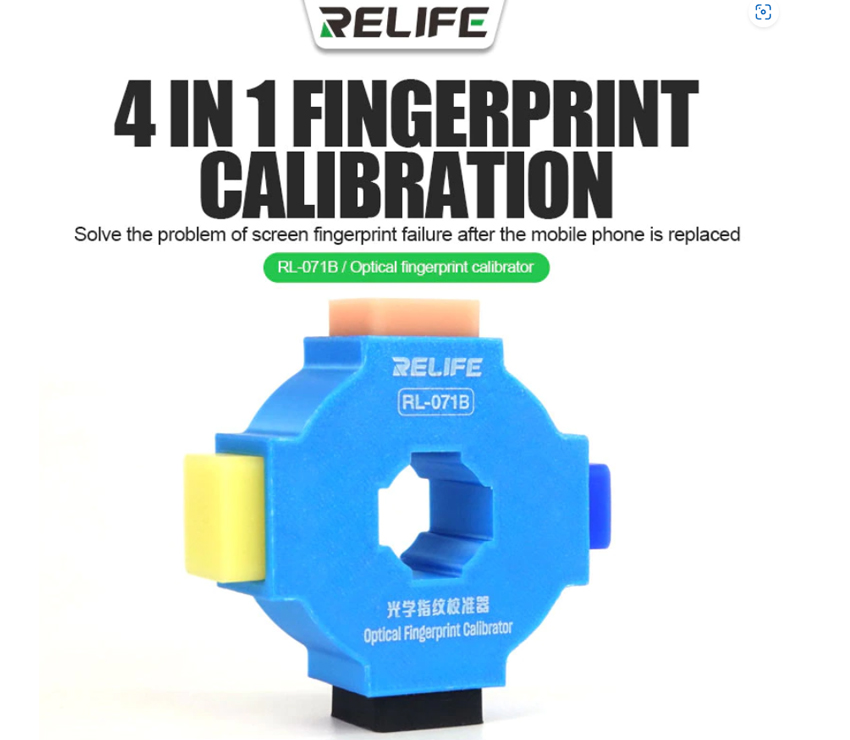
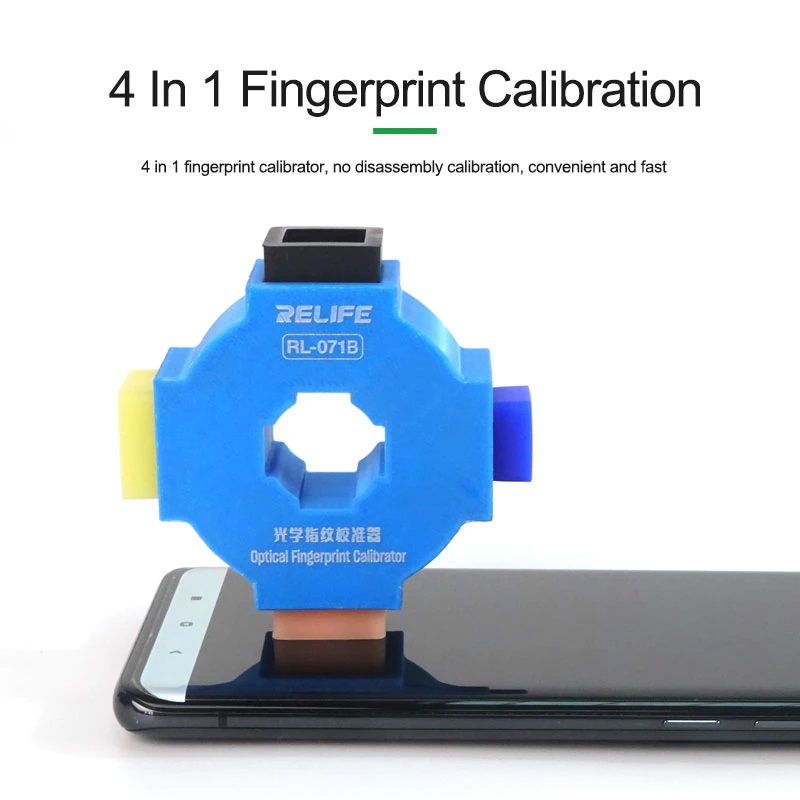
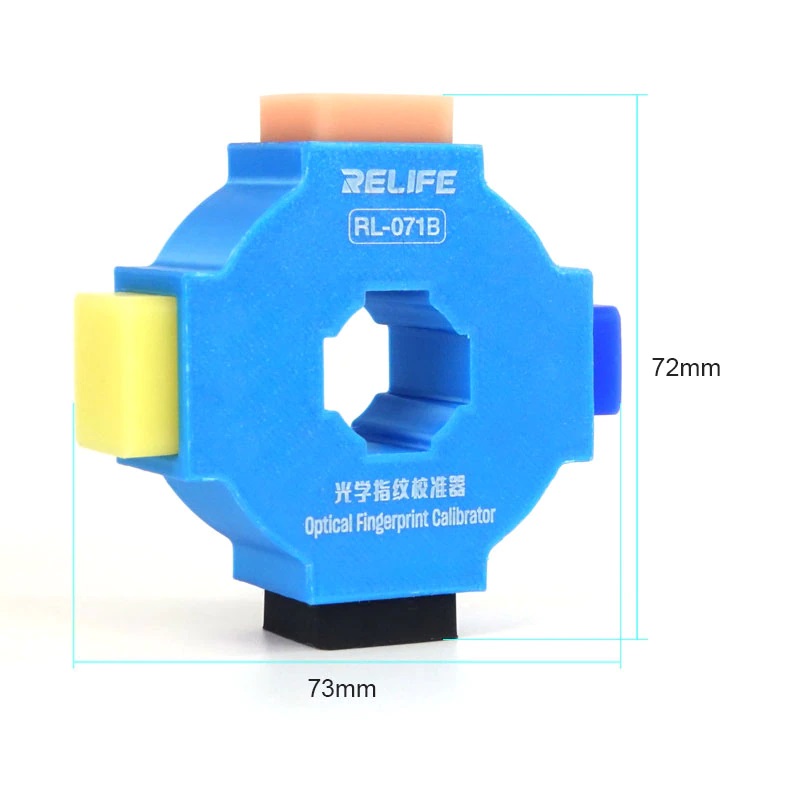
Relife RL-071B - 3rd Generation Fingerprint Calibration Tool
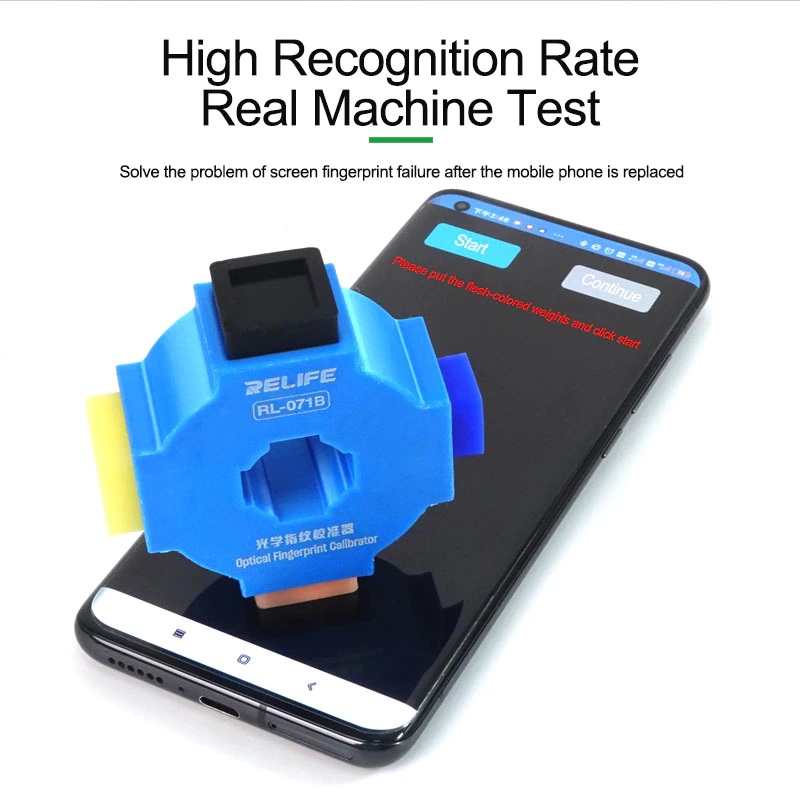
The Relife RL-071B is an indispensable professional tool for optical fingerprint sensor calibration. It is essential for restoring correct fingerprint functionality after screen replacement on brands such as Xiaomi, Huawei, Vivo, and Oppo.
? Operating Procedure:
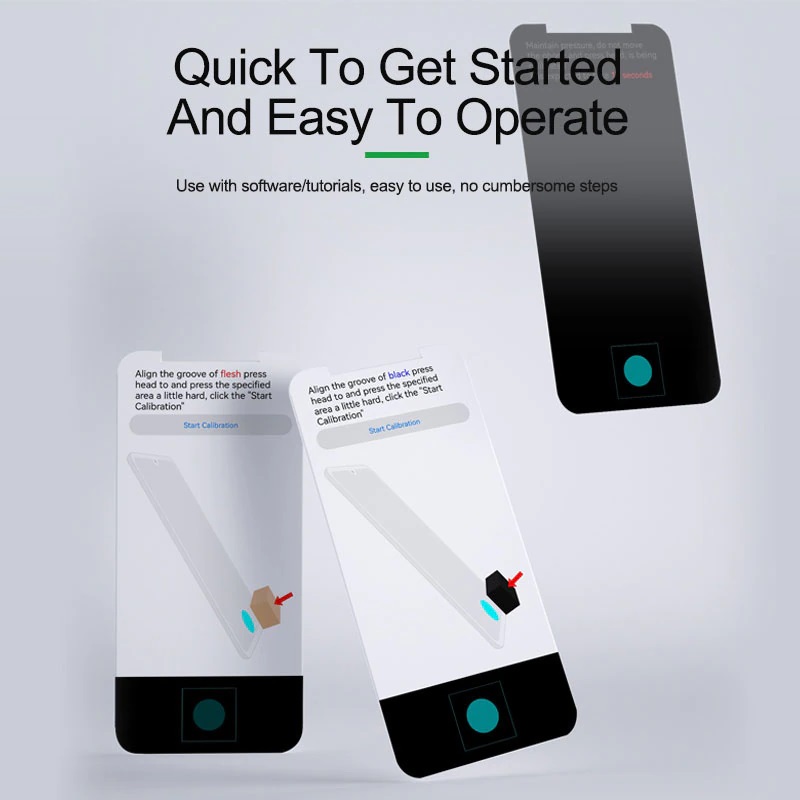
To start the calibration, enter the following codes on the phone dialer:
- ? XIAOMI: Dial
*#*#6484#*#* - ? OPPO: Dial
*#899#or6776 - ? VIVO: Dial
*#64663# - ? HUAWEI: HarmonyOS/Android - Download the APK app here and finish by installing it on the smartphone.
⚠️ Important Installation Notes:
When replacing the display (whether original or compatible), pay close attention: if the screen is not installed correctly, the calibration will fail at the final step. If the error persists, we recommend disassembling and reinstalling the screen with greater precision.
⚙️ Technical Features:
- Compatible with under-display optical sensors.
- Solves the "Unable to complete calibration" issue after LCD/OLED replacement.
- Lightweight, portable, and easy-to-use tool.